Ok so, for the non-savvy this isn't the easiest game to access, so I'm here to help with that! Lucky you!
Step 1: Use Internet Explorer. WAIT come back! I swear this is going somewhere, please, sit down, okay? Okay...relax, just listen. Use internet explorer and [get the latest version of Java](http://www.java.com/en/download/).
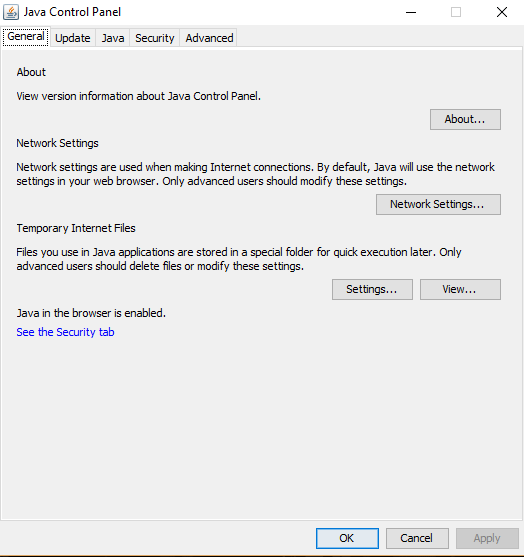
Step 2: Search on your computer for "Configure Java" then click it.
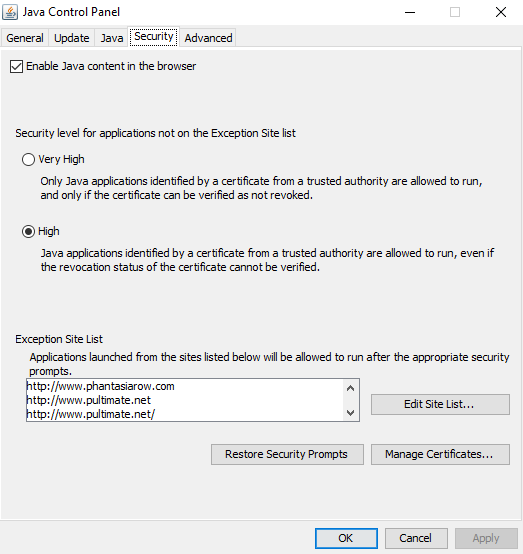
Step 3: This will pop up, now click "Security"
Step 4: Now click "Edit Site List"
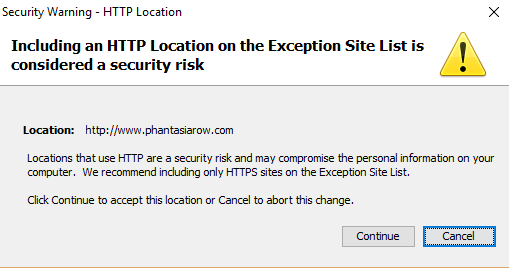
Step 5: Click "Add", find the empy bar, and type EXACTLY "http://www.phantasiarow.com" without quotes, then hit Enter, and this pretty bitch will pop up
Step 5a: This is just my preferred domain to connect, you can also use the following:
[http://www.riseofwarriors.com](http://www.riseofwarriors.com)
[http://www.riseofwarriors.org](http://www.riseofwarriors.org)
(thank you Link)
The base URL in your address bar will always work. Sometimes there's no "www" so adjust accordingly.
Step 6: Click "Continue" then "Ok" and open Internet Explorer again.
Step 7: Go to [http://www.phantasiarow.com](http://www.phantasiarow.com), hover over The Game and click play, now wait.
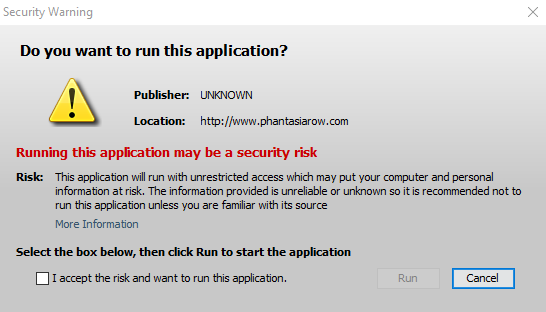
Step 8: This will pop up, check the box and click "Run"
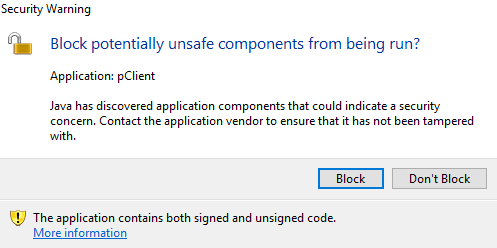
Step 9: Now this will pop up, make sure to click "Don't Block" don't get tricked here!
Step 10: Enjoy the game! Be sure to check out my quest guide [here!](http://phorums.phantasia5.com/index.php?thread/100-complete-quest-guide-how-to-access-the-undying-lands/)